Yet another post about getting stock data. I'll keep this terse. I use parquet format stored on my local drive. Let's dive in.
Start with the imports.
import polars as pl
import pandas as pd

from pandas_datareader import data as pdr
import yfinance as yf
yf.pdr_override()
Get the data from yf and save as csv to disk.
ticker = 'AMD'
df = yf.download(ticker, interval = '1d', start='2010-01-01')
df.to_csv(f'data/daily/{ticker}.csv')
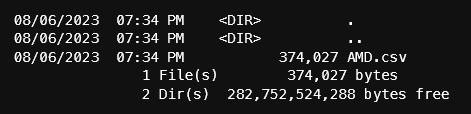
At the time that I'm getting this data, there are 3420 rows. On disk, the size of the csv file is 374k. Pandas can write csv to a compressed file by adding a ".gz" at the end to get a smaller size on disk. Reading a compressed csv file is not a problem for pandas.
Let's use the pandas to_parquet() function to save the data to parquet.
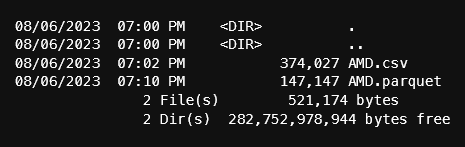
df.to_parquet(f'data/daily/{ticker}.parquet')Parquet file size improves on space:
Now, let's switch to using polars. In future posts, I will be using the lazy frame features of polars, so all my data will be in parquet format. In addition, I will use a polars query across many parquet files. It's very important that the format of the columns are the same in every file. Otherwise, polars will complain and all the hard work to get the data will be for nothing.
There was an instance where yf was returning a float64 for volume. This will cause data consistency problems so we'll cast the Volume column to int64. In the next code block, we'll convert the pandas dataframe to polars, cast the volume column and add a "Symbol" column. Adding the symbol will be apparent later.
df_pl = (pl.from_pandas(df.reset_index())
    # add a column for the symbol
    # cast the volume column to a type int64
    .with_columns([
        pl.lit(ticker).alias("Symbol"),
        pl.col("Volume").cast(pl.Int64),
        pl.col("Date").cast(pl.Date)
    ])
)
# save to file
df_pl.write_parquet(f'data/daily/{ticker}.parquet')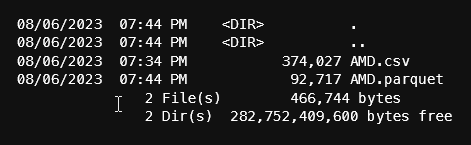
From the output above, notice that the parquet file that polars saved is smaller than pandas. By default, pandas has compression set to 'snappy' when saving as parquet so there may be other options to reduce the size.
Let's add a few more tickers, but this time all in 1 line:
ticker = 'SNOW'
(pl.from_pandas(yf.download(ticker, interval = '1d', start='2010-01-01', progress=False).reset_index())
    # add a column for the symbol
    # cast the volume column to a type int64
    .with_columns([
        pl.lit(ticker).alias("Symbol"),
        pl.col("Volume").cast(pl.Int64),
        pl.col("Date").cast(pl.Date)
    ])
    .write_parquet(f'data/daily/{ticker}.parquet')
)
Finally, let's query on all the parquet files using polars' lazy frame. This recipe will get the first and last date of the data in all the files we have by grouping on the symbol (the symbol column comes in handy). Polars will evaluate the query and only return the completed rows. This process will save on memory not to mention the speed improvements.
(pl.scan_parquet('data/daily/*.parquet')
    .groupby(['Symbol'])
    .agg(
        pl.col("Date").min().alias("First Date"),
        pl.col("Date").max().alias("Last Date")
    )
    .collect()
)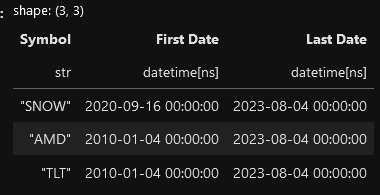
Notice that SNOW's First Date is the day it went IPO in 2020 while TLT and AMD have a first date that we defined in the yf data request.
Get the notebook from my github repo here: https://github.com/cbritton/Notebooks/blob/main/1.GettingData.ipynb